Face Verification
Alignment + embeddings + TAR@FAR, with a consent-based attendance tool and an explicit ethics & limits section.
Decides whether two face photos show the same person, and builds a small consent-based attendance check-in on top. Detection (YuNet), alignment and embedding (SFace) use OpenCV’s model zoo only: no extra dependencies, ~33 ms per face on a laptop CPU. Evaluated on the standard LFW benchmark with its official 10-fold protocol.
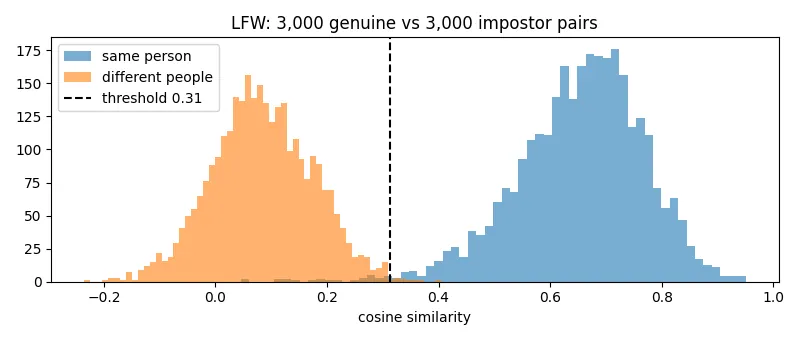
Cosine similarity for 3,000 same-person pairs vs 3,000 different-people pairs: two well-separated humps, with the decision threshold between them.
Results
LFW, 6,000 pairs (7,701 images), 10-fold cross-validation: the threshold is chosen on 9 folds and tested on the 10th, every time.
| Model | Accuracy (10-fold) | ROC AUC | TAR @ FAR = 1 % | TAR @ FAR = 0.1 % | Faces not detected |
|---|---|---|---|---|---|
| SFace FP32 | 99.35 % ± 0.37 | 0.9988 | 99.27 % | 98.80 % | 0 / 7,701 |
| SFace INT8 | 99.22 % ± 0.55 | 0.9988 | 99.10 % | 98.67 % | 0 / 7,701 |
TAR @ FAR = 0.1 %: if the system wrongly accepts only 1 in 1,000 impostors, it still accepts 98.8 % of genuine users. For reference, OpenCV reports 99.60 % for SFace on LFW.
- INT8 brought no benefit here: same accuracy within noise, and slower (54.6 vs 33.0 ms per image). OpenCV’s default DNN backend doesn’t accelerate INT8 on this CPU (OpenVINO would, see project 19). Both timings were measured while another model trained on the same CPU, so absolute speeds are pessimistic.
Example images not shown: the dataset licence (LFW, research benchmark, no redistribution licence) does not allow redistribution; see the dataset page.
Hardest mistakes. Rejected genuine pairs involve occlusion (a hand over the face), extreme expressions and large pose changes. One false accept pairs two quite different-looking men at score 0.41: embedding errors aren’t always intuitive.
How it works
- Detect: YuNet finds faces and 5 landmarks (eyes, nose, mouth corners).
- Align: the landmarks warp each face to a canonical 112×112 crop (eyes at fixed positions), so the embedding sees faces in a standard pose.
- Embed: SFace (a lightweight network trained with a sigmoid-constrained hypersphere loss) maps the crop to a 128-number vector; vectors of the same person end up close together.
- Compare: cosine similarity between two vectors; above the threshold (0.31, from LFW) = same person.
- Attendance (
attendance.py): each enrolled person is represented by the average embedding of their photos. A new face is matched to the closest enrolled vector, or labeled “unknown” if no one is above the threshold. Only embeddings are stored, never photos.
Run it
.venv\Scripts\activate            # shared environment, from the repo root
cd 10-face-recognition
python evaluate.py                                  # LFW 10-fold evaluation + figures
python attendance.py enroll enroll_folder/          # one sub-folder of photos per person
python attendance.py identify group_photo.jpg       # labels every face, prints who checked in
python attendance.py identify 0                     # webcam
Tested end to end: enrolled two LFW identities from 2 photos each, then both were recognized from unseen photos and an unenrolled person was correctly labeled “unknown”.
Data and models
- LFW (Labeled Faces in the Wild, UMass Amherst): 13,233 web photos of 5,749 public figures, downloaded with scikit-learn’s official fetcher. Research benchmark; it’s also known to be demographically skewed (mostly white, male, adult public figures).
- YuNet (MIT) and SFace (Apache-2.0) from the OpenCV model zoo, via Hugging Face (
opencv/...). - Location:
../../cv-data/faces/(not committed).
Get them (PowerShell, from this folder):
$o = "..\..\cv-data\faces\outputs"; New-Item -ItemType Directory -Force $o | Out-Null
foreach ($f in "face_recognition_sface/face_recognition_sface_2021dec.onnx",
               "face_recognition_sface/face_recognition_sface_2021dec_int8.onnx",
               "face_detection_yunet/face_detection_yunet_2023mar.onnx") {
  Invoke-WebRequest "https://huggingface.co/opencv/$($f.Split('/')[0])/resolve/main/$($f.Split('/')[1])" -OutFile "$o\$($f.Split('/')[1])"
}
python -c "from sklearn.datasets import fetch_lfw_pairs; fetch_lfw_pairs(subset='10_folds', data_home=r'..\..\cv-data\faces', funneled=False, resize=0.1)"
Ethics and limits
Face recognition identifies people, so the engineering choices here are deliberate:
- Consent first. The attendance tool is meant for people who choose to enroll (a class, a team).
It stores only embeddings; removing someone’s folder and re-running
enrolldeletes them. - 99 % on LFW ≠ 99 % in the real world. LFW photos are mostly well-lit, frontal-ish photos of celebrities. Accuracy drops with low light, masks, age gaps, and cheap cameras.
- Bias is not measured here. LFW doesn’t support a meaningful per-demographic breakdown; a real deployment must be audited on a balanced dataset (e.g. RFW, FairFace) before use.
- No liveness check. A printed photo of an enrolled person would pass. Anti-spoofing (blink or depth checks, or a dedicated presentation-attack model) is required before any access-control use.
Next steps
- Anti-spoofing (presentation-attack detection) for the attendance tool.
- Fairness audit on a demographically balanced benchmark.
- Run SFace through OpenVINO to get a real INT8 speed-up.
Tech stack
Python · OpenCV (FaceDetectorYN, FaceRecognizerSF) · scikit-learn (LFW, ROC) · NumPy · Matplotlib