Zero-Shot Auto-Labeling
Grounding DINO + SAM label images from a text prompt and beat a COCO-trained YOLO, 118× slower.
Type the names of the objects you want (“ski pole, helmet, goggles”) and get bounding boxes and pixel masks for a whole folder of images, written as YOLO-format labels. No training, no hand-drawn boxes: Grounding DINO finds objects from a text prompt, SAM turns each box into a mask. The point is to bootstrap a labeled dataset that you then review instead of drawing from scratch.
Example images not shown: COCO images are Flickr photos under mixed licences; see the dataset page.
Prompts with objects COCO has no labels for (goggles, glove, ski pole, curb, cap). Mistakes are visible too: “street lamp” lands on the stop-sign post.
Results: how good are labels from a text prompt?
200 COCO val2017 images containing at least one of 10 classes (person, bicycle, car, bus, dog,
cat, horse, bird, bottle, chair), scored with the official COCO metric (pycocotools).
| Model | Training on these labels | mAP50-95 | mAP50 | Recall (AR@100) | CPU time / image |
|---|---|---|---|---|---|
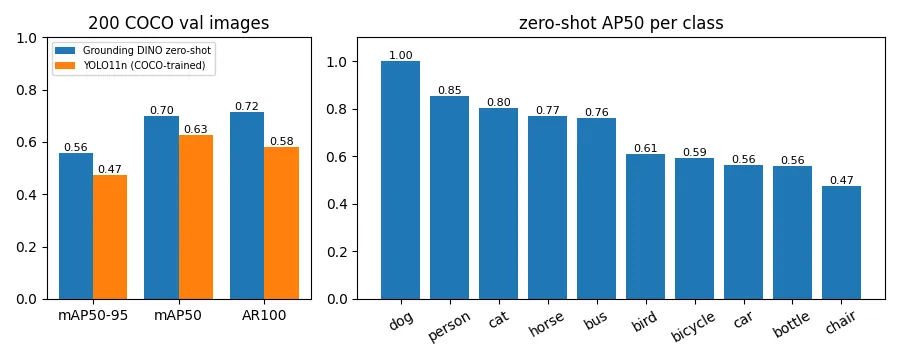
| Grounding DINO-T (zero-shot, text prompt only) | none | 0.558 | 0.699 | 0.715 | 9.36 s |
| YOLO11n (supervised on COCO) | full COCO train set | 0.473 | 0.628 | 0.580 | 0.08 s |
A model that has never seen a COCO label beats a small detector trained on COCO, but is ~118× slower. That trade-off is exactly why auto-labeling is useful: run the big open-vocabulary model offline once to label data, then train a small fast model (like YOLO11n) on those labels for deployment (knowledge distillation through labels).
Per-class AP50 (zero-shot): person 0.85 · dog 1.00* · cat 0.80 · horse 0.77 · bus 0.76 · bird 0.61 · bicycle 0.59 · car 0.56 · bottle 0.56 · chair 0.47
*Few dog instances in this 200-image subset; per-class numbers on small subsets are noisy. Large, distinctive objects transfer best from text; small or cluttered ones (bottles, chairs in a room, distant cars) are harder.
Caveat: YOLO11n is the smallest YOLO (2.6 M parameters); larger YOLO models score higher. The comparison shows that zero-shot labels are good enough to train from, not that zero-shot is “better than supervised” in general.
How it works
- Grounding DINO (
autolabel.py) encodes the image and the prompt ("ski pole . helmet . goggles .") jointly. Its decoder predicts boxes and, for each box, which phrase of the prompt it matches. Because classes are just text, any noun phrase works. - Phrase → class: the matched phrase is mapped back to one of your class names.
- SAM (Segment Anything, ViT-B) takes each box as a prompt and returns a pixel mask.
- Export: one YOLO label file per image (
class cx cy w h, normalized) plusclasses.txt, and optionally one PNG mask per object. - Evaluation (
evaluate.py): both detectors’ outputs are converted to COCO results format and scored withCOCOeval, restricted to the same images and classes.
Data
- Images: COCO val2017 (shared with project 16), with
instances_val2017.jsonground-truth boxes for evaluation. - Models:
IDEA-Research/grounding-dino-tiny(Apache-2.0),facebook/sam-vit-base(Apache-2.0), Ultralytics YOLO11n (AGPL-3.0) as the supervised reference.
Run it
.venv\Scripts\activate            # shared environment, from the repo root
cd 17-auto-labeling
# label your own folder (YOLO .txt labels; --masks also saves SAM masks)
python autolabel.py --images path\to\photos --classes "car, person, traffic light" --out labels --masks
# reproduce the evaluation (~35 min on CPU)
python evaluate.py --n 200
The evaluation needs the COCO val2017 images (see project 16) and the box annotations (PowerShell, from this folder):
$d = "..\..\cv-data\clip-search"
Invoke-WebRequest http://images.cocodataset.org/annotations/annotations_trainval2017.zip -OutFile "$d\ann.zip"
tar -m -xf "$d\ann.zip" -C $d annotations/instances_val2017.json
What I learned / what didn’t work
- Zero-shot is accurate but slow on CPU (9.4 s per image for the tiny model). Fine for labeling a few thousand images overnight, far too slow for live video. Hence label offline, then train a fast model.
- Prompt wording matters. Grounding DINO matches phrases, so “street lamp” can latch onto any pole-like object. Specific, visually distinctive phrases work best; ambiguous ones need review.
- Low thresholds for evaluation, higher ones for labeling. mAP needs the full precision/recall curve (box threshold 0.15), but auto-labels should use ~0.3+ so a human reviews fewer false boxes.
- Labels still need a human pass. 0.70 mAP50 means real misses and false positives; the value is turning “draw every box” into “fix some boxes”.
Next steps
- Close the loop: auto-label a few hundred images of a new class (e.g. hard hats for project 07), train YOLO11n on them, and compare it with a model trained on human labels.
- Export Grounding DINO to OpenVINO (project 19) to cut the 9 s per image.
- Add a review UI (accept / fix / delete boxes) before export.
Tech stack
Python · Hugging Face Transformers (Grounding DINO, SAM) · PyTorch · pycocotools · Ultralytics YOLO11 · Matplotlib